Monday, 12 May 2014

How to build Java based cloud application

Recently, we were tasked to develop a SAAS application for big data analysis. To do data mining, the system need to store multi billion public posts in the database and run the classification process on them.

Classification in our context is a slow, resource intensive and painful process to assign a topic or sentiment to any record in the database. The process can last up to 24 hours with our testing data.

To cope with these requirements, our obvious choice is to build a cloud application on Amazon Web Services. After working on the project for a while, I want to share my own thought, understanding and approach to build Java based cloud application.


What is Cloud Computing

Let start with Wikipedia first:

"Cloud computing involves distributed computing over a network, where a program or application may run on many connected computers at the same time."

The definition may be a bit ambiguous but it is understandable as In The Cloud itself is more of a marketing term rather than technical term. For a newbie, it is easier to understand if we define it with a more practical way:

The only difference between traditional web application with the cloud web application is the ability to scale perfectly. Cloud application should be able to cope with unlimited amount of works given unlimited hardware. 

Cloud application is getting popular nowadays because of higher requirement for modern application. In the past, Google is famous for building high scale application that contains almost all available information in the internet. However, for now, many other corporates need to build applications that serve similar scale of data and computation (Facebook, Youtube, LinkedIn, Twitter,.. and also the people who crawl and process their data like us).

This amount of data and processing cannot be achieved with the traditional way of developing application. That lead us to an entirely different approach to build application that can scale very well. This is cloud application.


Why traditional approach of developing web application does not scale well enough

Traditional Approach of developing web application

Let take a look on why traditional application cannot serve that scale of data.


If you have developed one traditional web application, it should be pretty much similar to the diagram above. There are some other minor variations as merging of application server and web server or multiple enterprise servers. However, most of the time, the database is relational. Web servers are normally stateful while enterprise servers can serve both stateless and stateful services. 

There are some crucial weaknesses that cause this architect does not scale well enough. Let start our analysis with defining perfect scalability first.

Perfect scalability can be achieved if a system can always provide identical response time for double amount of work given double amount of bandwidth and double amount of hardware.

Perfect scalability cannot be achieved in real life. Rather, developers only aim to achieve near perfect scalability. For example, DNS servers are out of our control. Hence, theoretically, we cannot serve higher amount of requests than the DNS servers. This is the upper bound for any system, even Google.

SQL

Come back to the diagram above, the biggest weakness is the database scalability. When the amount of requests and size of data are small enough, developers should not notice any performance impact when increasing load. Continue to increase the load higher, the impact can be very obvious, if the CPU is 100% utilized or memory fully occupied. At this point, the most realistic option is to pump more memory and CPU to the database system. After this, the system may perform well again. 

Unfortunately, this approach cannot be repeated forever whenever problems arise. There will be a limit where no matter how much ram and CPU you have, performance will slowly getting worse. This is expectable because you will have some certain records that need to be create, read, update, delete (CRUD) by many requests. No matter whether you choose to cache them, store them on memory or do whatever trick, they are unique records, persisting in a single machine and there is a limit on amount of access requests that can be sent to a single memory address. 

This is the unavoidable limit as SQL is built for integrity. To ensure integrity, it is necessary that any information in SQL server should be unique. This characteristic still applicable even after data segregation or replication are done (at least for the primary instance).

In contrast, NoSQL does not attempt to normalize data. Instead, it chooses to store the aggregate objects, which may contain duplicated information. Therefore, NoSQL is only applicable if data integrity is not compulsory. 


Above example (from couchbase.com) shows how data is stored in a document database versus relational database. If a family contains many members, relational database only store a single address for all of them while NoSQL database simply replicate the housing address. When a family relocate, the housing addresses of all members may not be updated in a single transaction, which cause data integrity violation. 

However, for our application and many others, this temporary violation is acceptable. For example, you may not need the amount of page views on your social page or amount of public posts in a social website to be 100% accurate.

Data duplication effectively removes the concurrent access to a single memory address that we mentioned above and give developers the option to store data anywhere they want, as long as the changes in one node can be slowly synced up to other nodes. This architect is much more scalable.

Stateful

The next problem is stateful service. Stateful service requires the same set of hardware to serve requests from the same client. When the amount of clients increase, the best possible move is to deploy more application servers and web servers into the system. However, the resource allocation cannot be fully optimized with stateful services. 

For traditional applications, load balancer does not have any information of system load and normally spread the requests to different servers using Round Robin technique. The problem here is not all requests are equals and not all clients are sending identical amount of requests. That cause some servers are heavily overloaded while others are still idle.

Mixing of data retrieval and processing

For traditional applications, the server that retrieve data from database ends up processing it. There is no clear separation of processing data and retrieving data. Both of the two tasks can cause bottle neck to the system. If the bottle neck come from data retrieval, data processing is under-utilized and vice versa. 


Rethinking best approaches to build scalable application

Look at what have been adopted in our IT fields recently, I hardly found them as new inventions. Rather, they are adoption of the practices that have been used succesfully in real life to solve scalability issue. To illustrate this, let imagine a real life situation of tackling scalability issue.

Hospital


Assume that we have a small hospital. For our hospital, we mostly serve loyal customers. Each loyal customer have a personal doctor, who keeps track of his/her medical record. Because of this, customers only need to show the ICs to be served by the preferred doctors. 

To make things challenging, our hospital is functioning before the internet era.

Stateless versus stateful

Is the description above look similar enough to stateful service? Now, your hospital is getting famous and the amount of customers suddenly surges. Provide that you have enough infrastructure, the obvious option is to hire more doctors and nurses. However, customers are not willing to try out new doctors. That cause the new staffs are free while old staffs are busy. 

To ensure optimization, you choose to change the hospital policy so that the customers must keep their medical records and the hospital will assign them to any available doctors. This new practice helps to resolve all of your headache and give you the option to deploy more seasonal staffs to cope with sudden surge of clients. 

Well, this policy may not make the customers happy but for IT fields, stateless and stateful services provide identical results.  

Data Duplication

Let say the amount of customers constantly surge and you start to consider opening more branches. At the same time, there is a new rising problem that customers constantly complain about the need of bringing medical records while visiting hospital. 

To solve this problem, you come back to the original policy of storing the medical records at the hospital. However, as you are having more than one branch, each branch need to store a copy of user medical records. At the end of the day or the week, any record change need to be synced to every branch.

Separation of Services

After running the hospital for a few months, you recognize that the resources allocation are not very optimized. For example, you have blood test and X-ray faculty in both branch A and B. However, there are many customer doing blood test in branch A and many people taking X-ray in branch B. 

It cause the customers keep waiting in one branch, while no one visit the other branch. To optimize resource, you shutdown the under-utilized faculties and setup unique blood test centre and X-ray centre. Customers will be sent from the branches to the specialized centres for special services.

Adhoc Resource

It is hard to do resource planning for hospital. There are seasonal diseases that only happens at a certain time of the year. Moreover, catastrophe may happen any time. They cause sudden surge of warded patients for a short period. To cope with this, you may want to sign agreement with the city council to temporarily rent facilities when needed and hire more part-time staffs.

Apply these ideas to build cloud application

Now, after looking at the example above, you may feel that most of the ideas make sense. It only take a short while before developers start to apply these ideas into building web application. 

Then, we move to the cloud application era.  


How to build cloud application

To build a cloud application, we need to find way to apply the mentioned ideas into our application. Here is my suggest approach

Infrastructure

If you start to think about building cloud application, infrastructure is the first concern. If your platform does not support adhoc resource (dynamically bursting of existing server spec or spawning new instance), it is very hard to build cloud application. 

At the moment, we choose AWS because it is the most matured platform in the market. We have moved from internal hosting to AWS hosting one year ago due to some major benefits
  • Mutiple Locations: Our customers are coming from all 5 continents, using Amazon Region, we can deploy the instance closer to customer location, through that, reduce the response time.
  • Monitoring & Auto Scaling: Amazon offers quite a decent monitoring service for their platform. Due to server load, it is possible to do Auto Scaling.
  • Content Delivery Network: Amazon CloudFront give us the options to offload static contents from our main deployment, which will improve page load time. Similar to normal instances, static contents can be served from the nearest instances to customer. 
  • Synchronized & Distributed Caching: MemCache has been our preferred caching solution over the years. However, one major concern is the lack of support for synchronization among the nodes. Amazon Elastic Cache give us the option to use MemCache without worrying about node synchronization
  • Management API: This is one major advantage. Recently, we start to make use of Management API to spawn up instance for a short while to run integration test.
Database

Provide that you have select the platform for developing cloud application, the next step should be selecting the right database for your system. The first decision you need to make is whether SQL or NoSQL is the right choice for your system. If the system is not data intensive, SQL should be fine, if the reverse is true, you should consider NoSQL. 

Sometimes, multiple databases can be used together. For example, if we want to implement a Social Network application like Facebook, it is possible to store system settings or even user profiles in SQL database. In contrast, user posts must be stored in the NoSQL database due to huge volume of data. Moreover, we can choose SOLR to store public posts due to strong searching capability and Mongo DB for storing of user activities. 

If possible, please choose the database system that support clustering, data segregation and load balancing. If not, you may end up implement all of these features yourself. For example, SOLR should be the better choice compare to Lucene unless we want to do our own data segregation.  

Computing Intensive or Data Intensive

It is better if we know that the system is data intensive or computing intensive. For example, Social Network like Facebook is pretty much data intensive while our big data analysis are both data intensive and computing intensive. 

For data intensive system, we can let any node in the cloud retrieve data and do processing as well. For computing intensive node, it is better to split out data retrieval and data processing. 


Data intensive system normally serve real-time data while computing intensive system run the background jobs to process data. Mixing these two heavy tasks in the same environment may end up reducing system effectiveness.

For computing cloud, it is better to have a framework to monitor load, distribute tasks and collect results at the end of computing process. If you do not need the processing to be real time, Hadoop is the best choice in the market. If real time computation is required, please consider Apache Storm.

Design Pattern for Cloud Application

To build a successful Cloud Application, there are something that we should keep in mind.

1. Stateless

It is a must to make all your services and server stateless. If the service need user data, include them as parameter in the API.

It is worth noticed that to implement Stateless Session on Web Server, we have a few choices to consider:
  • Cookie based session
  • Distributed Cache session
  • Database Session
The solutions above are sorted from up to down with lower scalability but easier management. 


For Cloud Application, most of the API call will happen through the network rather than internal method calls. Therefore, it is better if we can make the method calls safe. If you stick to the Stateless principle above, it is  likely that the services you implement are already idempotent.


Remote Facade is different with Facade pattern. They may look similar in term of practice but aim to fix different problems. As most of your API calls happen over the network, the network latency contribute a great part to the response time. With Remote Facade pattern, developers should build a coarse-grained API so that the amount of calls can be reduced. 

In layman's terms, it is better to go to supermarket and buy 10 things in one shot rather than visit 10 times, each time buy 1 thing.

4. Data Access Object

As you may transfer the data around, be careful with the amount of data you transfer. It is best to only give the minimum data as required. 

5. Play Safe

This is not a design pattern but you will thanks yourself for playing safe in the future. Due to the nature of distributed computing, when something go wrong, it is very difficult to find out which part is wrong. If possible, implement health check, ping, thoroughly logging, debug mode to every component in the system.


Conclusion

I hope this approach to build Cloud Application can bring some benefit to everyone. If you have other opinions or experience, kindly feedback and share with us.

In the next article, I will share the design of our Social Monitoring Tool.

Sunday, 4 May 2014

From Scrum to Kanban

This month marks one year from the time we switched from Scrum to Kanban. I find it is a good time for us to review the impact of this change.

Our Scrum

I have experienced two working environment that practice Scrum and still they are quite different. That why it may be more valuable if we start with sharing of our Scrum practice.

Iteration

Our iteration is 2 weeks long. I am quite satisfied with the duration as one week is a bit too short to develop any meaningful story and 1 month is a bit too long to plan or to do retrospective.

Our iteration start with the first Monday morning retrospective. In the same day after noon, there is iteration planning. For the rest of the iteration, we do coding as much we want.

Our product owner request us to do two rounds of demo, soft demo on the last Wednesday of iteration, where we can show the newly developed features on development machine or Stage environment. On the last day of iteration, we suppose to do final demo on UAT environment in order to get the stories accepted.

Agile emphasize on adapting to change, but we still do T+2 planning (two iterations ahead). With this practice, we know quite well what is going to be delivered or to be worked on for at least one month ahead. If there is urgent work, the iteration will be re-planned and some stories will be pushed back to next iteration.

Daily Life

Our daily life starts with a morning alarm. Some ancient coders in the past set the rule of using alarm for office starting hour. Anyone come to office after the alarm ring will have the honour to donate 1 dollar to the team fund.  This fund can be used to host retrospective outdoor or to buy coffee. To be honest, I like this idea, even it effectively cut 22 dollars to my monthly income.

15 minutes later, we have another alarm for the daily stand-up. This short period supposed to be used to read email and catchup with what happen overnight. Our team bases in Asia but is actively working with project stakeholders in Europe and US. That why we need this short email checking session to have a meaningful stand-up.

It is not really Scrum practice, but like most of other corporate environments, we need to fill up time-sheet at the end of the day. Using time-sheet, we keep track of the time spent versus the estimated effort and use that to calculate velocity.

Roles

As specified by Scrum , we have development team and product owner. In our company, product owner are called Capability Manager. At the moment, our management are discussing whether they should split Capability Manager to two roles, one focus on technical aspect of product and the other solely focus on business aspect.

We do not have Scrum master, instead, we have Release Manager. This role is a bit confusing because it does not appear in any practice. In our environment, Release Manager work more like the traditional Project Manager. Not all the projects we have Release Manager but for some bigger scale projects, Release Manager can be quite useful and quite busy as well. Most of our products are SAAS applications, and some successful products can have more than 100 customers worldwide. Capability Manager can focus on product features and let the Release Manager deal with story planning, customer deadline and minor customization.

There is also one more discussion on whether Release Manager job requires technical background as they need to do iteration planning and some stories are technically related.

Tools

We use mixture of Excel spreadsheet, Jira and Rally in our daily life.

Jira is the leftover tool of the past, before we move to Rally. Now, we only use Jira to track support tickets and defects.

Rally is the online platform for Agile practice with built-in support for iteration, story, defect, release, backlog,..

Even with these tool, we cannot avoid using the old day spreadsheet to keep track of team resources (team resource pipeline) and do resource planning (resource matrix) as well.

Due to resource scarcity, we still have multi-tasks team that deal with few projects and few product owners at the same time. Periodically, the release managers need to sit together and bargain for their resource next few iterations.

Spirit

As one of my friend always say, Scrum is more about spirit rather than practices. I can't agree more with this. Applying Scrum is more about doing things with Scrum mindset rather than strictly following written practices. Personally, I feel we are applying Scrum quite well.

At first, in the team standup, we try our best to avoid making it look like a progress report but information sharing and collaborating session. Once in a while, the standup last more than default 15 minutes because developers spend time elaborating ideas and discussing on the spot. Release Manager or Product Owner do not join our daily standup.

Our retrospective is a close door activity, which only involve team member. Both Release Manager and Product Owner will not join us unless we call them in to ask for information. Each team member takes turn to be the facilitator. The format of retrospective is not fixed. It is up to the facilitator imagination to decide what will we do for the retrospective. The rest just sit down, relax and wait to see what will  happen next.


The planning sessions includes tasking and Poker Style estimation game. It is up to the team to re-estimate (we estimate one time when the story still in backlog), verify the assumption and later arrange and commit the story to fit team resource for this iteration nicely. Sometimes, we have a mini debate if there is big gap between team member estimations.


Why we moved to Kanban

You may wonder if our Scrum work so well, why did we move to Kanban. Well, it was not our team decision. Kaban was initiated at UK headquarters and spread to other regions. However, working with Scrum is not all perfect, let I share with you some of problems that we are facing.

Resource Utilization at the end of iteration

This problem may not be very severe in our office but it is a big concern in other regions. Due to technical difficulties, sometimes, estimation is very far from spent effort. This leave a big gap at the end of iteration. It may be good if the gap is big enough to schedule another story but most of the time, it does not. This creates the low productivity issue that management want to fix. They hope removing iteration will remove this virtual gap and let the developers focus on delivering work.

The pressure from iteration commitment

By committing to the planned stories in the iteration, we are under the pressure to deliver it. The stories were estimated with 2 weeks duration for development but we normally need to deliver them faster to match the soft demo on Wednesday and final demo on Friday.

To make thing worse, our Web Service team is in other region and we need to raise the deployment ticket one day in advance to get things done. If the deployment ticket failed, we need one more day to redeploy. The consequence is whether we develop too fast to meet the deadline or we follow the estimation, then miss the commitment.

Another concern is the pressure to estimate and commit to something developers don't know so well and still be punished for missing the commitment. This creates the defensive mindset where developers will try to include a  safety buffer on any estimation they make.

Then, our Kanban

Life is not so much different when we move to Kanban. For the good, we have the budget to buy a big screen. For the bad, we do not do iteration planning any more. However, we still keep our retrospective on first Monday morning.

Kanban board

Now, we open the Kanban board in Rally to track our development progress.


We create our Kanban board with 7 columns, which reflect our working process

  • None (equals to backlog)
  • Tasking
  • Building
  • Peer Review (only after Stage deployment)
  • Deploy to UAT
  • Acceptance (story is signed of by Product Owner)
  • Deploy to LIVE 

The product owner creates stories in backlog, which will be pulled to Tasking column by Release Manager. After that, it is development team responsibility to move this story to Deploy to UAT column. After that, it is product owner responsibility to verify and accept it. If there is any feedback, the story will be put back to Building column. Otherwise, it is signed off and ready to be deploy to Production. It is up to the Release Managers when they want to deploy the accepted feature to Live environment.

As Kanban practice, we want to limit multitasking and set the threshold of the capacity for each column. As we do pairing, with 8 developers in our team, the threshold for each column suppose to be no more than 4. However, this is easier to say than do as stories are often blocked by external factor and we need to work on something else.

Planning

There is no iteration planning any more. Rather, we do planning whenever there is new story in Tasking column. The story is both tasked and estimated by one pair rather than collecting inputs from the whole team.

What is a bit unnatural is due to our multi-tasking nature, one pair do not follow one story from Tasking until Deploy to UAT. To deal with this, we often need to come back to the pair that do tasking to ask for explanation.

Demo

We still need to estimate but there is not fixed time for demo. In the regular meeting between team and Release Manager, the most asked question is "Do you have anything to demo today?" and the most popular answer is "No".

Estimation

When aborting Scrum, we also abort Story Point Estimation. We still count the spent effort versus estimated effort but it only for reference. From last year, we moved back to estimation by pair day.

Our feeling

So, how do we feel after one year practising Kanban?

I think it is a mixture feeling. On the good side, there are less thing to worry about, less commitment to keep and better focus on development. Plus, we have the big screen to look at it every morning.

However, things are not all rosy. I do not know whether we do Kanban the wrong way or it is just the natural of Kanban, developers do not follow one story from beginning until the end. One guy may task the story this way following his skills set and someone else will end up delivering the work.

Moreover, I feel Kanban treating every developer equal, which is not so true. If there is one story available in Building Column and you are free, you must take the story, no matter you have the skill or not. It hamper the productivity of the team. However, it also can be positively viewed as Kanban fostering skills and knowledge sharing among developers.

Moving to Kanban also causes developers spending more time on story development. There is no pressure to cut corner to deliver but there is also a tendency to over-deliver good to have features, which are not included in the Acceptance Criterias.

That is for us, for Release Manager, they seem to be not so happy with the transition. Lack of iteration only make their planning more ambiguous and difficult.

Monday, 21 April 2014

10 ideas to improve Eclipse IDE usability

Few years ago, we had a mini IDE war inside our office. It happened between Eclipse and Netbeans supporters. Fortunately, we did not have IntelliJ supporter. Each side tried their best to convince people from the other side to use their favourite IDE.

On that war, I am the Eclipse hardcore supporter and I had a hard time fighting Netbeans team. Not as I expected, we end up on the defence side more often than attack. Look at what Netbeans offers, it is quite interesting for me to see how far Netbeans has improved and how Eclipse is getting slower and more difficult to use nowadays than in the past.

Let I share my experience on that mini war and my point of view on how Eclipse should be improved to keep its competitive edge.

What is the benefit of using Netbeans

For a long time and even up to now, Eclipse is still the dominant IDE in the market. But this did not happened before Eclipse 3.0, which was released in 2004. From there, Eclipse simply dominates the market share of Java IDE for the next decade. Even the C/C++ and Php folks also built their IDE plugin on top of Eclipse.

However, things is getting less rosy now. Eclipse is still good, but not that much better than its competitors any more. IntelliJ is a commercial IDE and we will not compare it to Eclipse in this article. The other and more serious competitor is Netbeans. I myself have tried Netbeans, compared it to Eclipse 3.0 and never came back. But the Netbeans that Eclipse is fighting now and the Netbeans that I have tried are simply too different. It is much faster, more stable, configurable and easier to use than I have known.

The key points of using Netbeans are the usability and first class support from Sun/Oracle for new Java features. It may not be very appealing to Eclipse veteran like myself but for a starter, it is a great advantage. Like any other wars in the technology worlds, Eclipse and Netbeans keep copying each other features for so long that it is very hard to find something that one IDE can do and the other one cannot. To consider the preferred IDE, what really matter is how things are done rather than what can be done.

Regarding usability, I feel Eclipse failed to keep the competitive edge it once had against Netbeans. Eclipse interface is still very flexible and easy to customize but the recent plugins are not so well implemented and error prone (I am thinking of Maven, Git support). Eclipse market is still great but lots of plugins are not so well tested and may create performance or stability issue. Moreover, careless release (Juno 4.0) made Eclipse slow and hangup often. I did not recalled restarting Eclipse in the past but that happened to me once or twice a month now (I am using Eclipse Kepler 4.3).

Plus, Eclipse did not fixed some of the discomforts that I have encountered from early day and I still need to bring along all the favourite plugins to help me ease the pain.

What I expect from Eclipse

There are lots of things I want Eclipse to have but never see from release note. Let share some thoughts:

1. Warn me before I open a big file rather than hang up

I guess this happen to most of us. My preferred view is the Package Explorer rather than Project Explorer or Navigator but it does not matter. When I search a file by Ctrl + Shift + R or left click on the file in Explorer, Eclipse will just open the file in Editor. If the file is a huge size XML file? Eclipse hangup and show me the content one minute later or I get frustrated and kill the process. Both are bad outcomes.


2. Have a single Import/Export configuration endpoint

For who does not know, Eclipse allow you to import/export Eclipse configuration to a file. When I first download a new release of Eclipse, there are few steps that I always do

  • Import -> Install -> From Existing Installation: This step help me to copy all my favourite features and plugins from old Eclipse to new Eclipse.
  • Modify Xms, Xmx in eclipse.ini
  • Import Formatter (from exported file)
  • Import Shortkey (from exported file)
  • Configure Installed JREs to point to local JDK
  • Configure Server Runtime and create Server.
  • Disable useless Validators
  • Register svn repository
  • And some other minor tasks that I cannot remember now...
Why don't make it simpler like Chrome installation when new Eclipse can copy whatever settings that I have done on the old Eclipse?


3. Stop building or refreshing the whole workspace

It happened to me and some of the folks here that I have hundred projects in my workspace. The common practice in our workplace is workspace per repository. To manage things, we create more than 10 Working Sets and constantly switch among them when moving to new task.

For us, having Eclipse building, refreshing, scanning the whole workspace is so painful that whether we keep closing projects or sometimes, create a smaller workspace. But can Eclipse allow me to configure scanning Working Set rather than Workspace? Working Set is all what I care.

Plus, sometimes, Ctrl + Shift + R and Ctrl + Shift + T does not reflect my active Working Set and not many people notice the small arrow on the top right of the dialogue to select this.


4. Stop indexing by Git and Maven repository by default

Eclipse is nice, it helps us to index Maven and Git repository so that we can work faster later. But not all the time I open Eclipse to work with Maven or Git. Can these plugins be less resource consuming and let me trigger the indexing process when I want?

5. Give me process id for any server or application that I have launched

This must be a very simple task but I do not know why Eclipse don't do it. It is even more helpful if Eclipse can provide the memory usage of each process and Eclipse itself. I would like to have a new views that tracking all running process (similar to Debug View) but with process id and memory usage.

6. Implement Open File Explorer and Console here

I bet that most of us use console often when we do coding, whether for Vi, Maven or Git command. However, Eclipse does not give us this feature and we need to install additional plugin to get it.


7. Improve the Editor 

I often install AnyEdit plugin because it offer many important features that I found hard to live without like converting, sorting,...

These features are so crucial that they should be packaged together with Eclipse distribution rather than in a plugin.


8. Stop showing nonsense warning and suggestion

Have any of you build a project without a single yellow colour warning? I did that in the past, but let often now.

For example, Eclipse asked me to introduce serialVersionUID because my Exception implements Serializable interface. But seriously, how many Java classes implement Serializable? Do we need to do this for every of them?

9. Provide me short keys for the re-factoring tools that I always use

Some folks like to type and seeing IDE dependent as a sin. I am on the opposite side. Whatever things can be done by IDE should be done by IDE. Developer is there to think rather than type. It means that I use lots of Eclipse short-keys and re-factoring tool like

  • Right click -> Surround With
  • Right click -> Refactor
  • Right click -> Source
Some of most common short keys I use everyday are Ctrl + O, Alt + Shift + L, Alt + Shift + M, Ctrl + Shift + F,... and I would like to have more. Eclipse allows me to define my own short keys but I would like it to be part of Eclipse distribution so that I can use them on other boxes as well. 

From my personal experience, some tools that worth having a short key are
  • Generate Getters and Setters
  • Generate Constructor using Fields
  • Generate toString()
  • Extract Interface
  • ...
I also want Eclipse to be more aggressive in defining Templates for Java Editor. Most of use are familiar with well-known Template like sysout, syserr, switch, why don't we have more for log, toString(), hashCode(), while true,...

10. Make the error messages easier to read by beginner

I have answered many Eclipse questions regarding some common errors because developers cannot figure out what the error message means. Let give few examples:

A developer uses command "mvn eclipse:eclipse". This command generates project classpath file and effectively disable Workspace Resolution. Later, he want to fix things by Update Project Configuration and encounter an error like below (if you want to understand this further, can take a look at the last part of my Maven series)


Who understand that? The real problem is the m2e plugin fail to recognize some entries populated by Maven and the solution is to delete all Eclipse files and import Maven project again.

Another well-known issue is the error message on pom editor due to m2e does not recognize Maven plugin. It is very confusing for newbie to see this kind of errors.

Conclusion

These are my thoughts and I wish Eclipse will grant my wishes some days. Do you have anything to share with us about how you want Eclipse to improve?

Saturday, 19 April 2014

Maven Explanation - part 3


The two earlier parts of the Maven series can be found here:
Part 1
Part 2

Up to now, we have covered Maven build lifecycle, plugin, repository and dependency management. In this part, let explore Maven module, setting, profile and IDE plugin.

Maven Modules

Parent Project 

Maven module is the part where Maven offer additional value to Ant. If you remember, Ant do not have project dependency, rather it only has task dependency. Of course, developers can use dependent tasks to execute other project build file, and through that, indirectly achieve project dependency. However, this is tedious. Moreover, if you want to child build.xml to inherit some properties, settings or even some tasks from parent build file, then it is even more difficult.

Maven take the project modules as part of its core concept and natively support it. Let start with a simple example.


We have a nested project here with the parent project named sample_maven_module. This project has 2 child projects, sub_module and web. The child project sub_module has another child project named sub_sub_module.

Below is the pom definition of the parent project:

<?xml version="1.0" encoding="UTF-8"?>
<project>
  <modelVersion>4.0.0</modelVersion>
  <groupId>com.blogspot.sgdevblog</groupId>
  <artifactId>sample_maven_module</artifactId>
  <packaging>pom</packaging>
  <version>0.0.1-SNAPSHOT</version>
  <name>Parent pom</name>

  <build>
    <pluginManagement>
      <plugins>
        <plugin>
          <artifactId>maven-compiler-plugin</artifactId>
          <version>2.3.2</version>
          <configuration>
            <source>1.6</source>
            <target>1.6</target>
          </configuration>
        </plugin>
      </plugins>
    </pluginManagement>
  </build>

  <dependencies>
    <dependency>
      <groupId>junit</groupId>
      <artifactId>junit</artifactId>
      <version>3.8.1</version>
      <scope>test</scope>
    </dependency>
  </dependencies>

  <modules>
    <module>web</module>
    <module>sub_module</module>
  </modules>
</project>

As you can see, a project can only have modules when it is packaging as pom. Parent project serve a special purpose, it is used to define common settings and declaration for child modules. If take a look at the effective pom view of child module, then we will see the parent plugins and dependencies above will be automatically inherited by the child modules.

With this feature, developers can define a common version for log4j, Spring framework, Junit or whatever plugins setting in the project.

In the above example, we have multiple layer of nested projects. If there is conflict among configurations, the configuration of nearest parent will be applied. For example, if in sub_module project, we declare

<plugin>
 <artifactId>maven-compiler-plugin</artifactId>
 <version>2.3.2</version>
 <configuration>
  <source>1.7</source>
  <target>1.7</target>
 </configuration>
</plugin>

Then, in the sub_sub_module project the source will be set to 1.7 rather than 1.6 as declared in grant parent project.

Maven module

There are two things to note about modules. Firstly, whatever mvn command trigger on parent project will be triggered by child projects as well. Secondly, Maven is smart enough to identify cross dependency among child modules and trigger the command in a proper order. However, if there is no cross dependency, the order of execution will follow declaration order.

For example, in the above project, we declare of sub_module in front of web. Normally, Maven will trigger command on sub_module, then web.

Put into practice, when we trigger mvn clean install on sample_maven_module project, here is the execution order

mvn clean install on sub_module
mvn clean install on sub_sub_module
mvn clean install on web

However, if we declare web as dependency of sub_sub_module, then sub_module will always be built first. The order will be changed as follow

mvn clean install on web
mvn clean install on sub_module
mvn clean install on sub_sub_module

It is understandable because the child module appear as dependency should be build first and Maven explore sub_sub_module only after exploring its direct parent project.

Maven Settings & Profiles

Assume that with the knowledge above, you have setup a wonderful Maven project that build like charm. Now, there are few common challenges that you may need to face if we deploy our project to other servers.

The database is set-up differently in Jenkins server and you may need another configuration for the sql plugin to populate test data. Moreover, the remote repository to deploy artifact may require authentication. For this kind of purpose, we need Maven Settings and Profiles.

For Maven newbie, the main difference between Settings and Profiles is Setting is stored in the box and Profile is part of project pom file. There are two possible places for settings.xml
  • The Maven install: $M2_HOME/conf/settings.xml
  • A user's install: ${user.home}/.m2/settings.xml
The first file contain global settings for Maven while the second file contains settings for specific user. Most of the time, we only need one.

There are reason for different mechanism of storage. Settings is considered more environment related than profile. Moreover, Settings is hidden from the projects itself.

Settings

From personal experience, I often use the Maven Settings to store information about remote repository and active profile. If you want to shorten the pom file, whatever common information about the infrastructure can be put under this file as well.

For example, only in Jenkins, you may want to generate version.txt that contain Jenkins build number and commit logs when Maven is built. Then in the pom file, declare plugin to do this task inside Jenkins profile. Then, in Jenkins settings.xml, we can activate this profile by

<settings>
  ...
  <activeProfiles>
    <activeProfile>jenkins</activeProfile>
  </activeProfiles>
  ...
</settings>

Profiles

Maven support this multiple profiles, so you can choose more than one profile to activate. There are many ways of activate a profile:

  • By jdk version
  • By OS
  • By existence of property
  • Activate by default
  • Activate by existence of file
  • Activate by specifying profile in mvn command

If a profile is not activated, all the contents inside are simply ignored by Maven.

Maven Plugins for IDE

All famous IDEs has support for Maven. However, they follow different approachs to make Maven work in IDE. With the only exceptions is Eclipse, all other IDEs let Maven run natively within the IDE. It means that any mvn command you trigger in IDE will effectively send the identical command to the console in project home. This works like you have a console open next to your IDE, just more convenient.

Eclipse Maven plugin (m2e) is much more ambitious. It tries to interpret Maven pom file to Eclipse project configuration. However, the biggest problem with this approach is the incomplete implementation. Many years after first release, the conversion of many Maven plugins to Eclipse configuration are not yet supported. It may be frustrated that Eclipse show error in pom file even the file is perfectly correct because m2e does not recognize the setting.  

Still, Eclipse approach bring some benefit, the first and foremost is workspace resolution. It helps when you build a project with multiple module. In stead of downloading dependencies from repository, m2e attempt to find any corresponding project and include this project in classpath rather than the packaged jar file. This provides immediate reflection of any API changes without going through the hassle of building dependent project.

As Eclipse settings do not fully support Maven configuration, here are some of  the common problems that you may encounter when using m2e plugin in Eclipse.

1/ Eclipse does not support dependency scope. Simply speaking, when the plugin help you to configure the classpath, it does not differentiate compile, runtime or test scope. Hence, in your IDE, no matter what scope you put, it always work but when you create deployment, only compile scope dependencies are available.

2/ Another similar issue is the lack of scope support for source folder. Most of common Maven projects includes src/main/java and src/test/java folder. However, if this project in included as dependency, Eclipse cannot differentiate the test source and main source folder. The consequence is the inclusion of test source folder into project classpath, which is not wanted.

Saturday, 12 April 2014

Maven explanation - part 2


In the earlier article, we have discussed Maven build lifecycle and plugins. In this article, we will continue to discuss Maven repository and dependency management.
Maven Repository & Dependency Management

Maven repository may be the most well known feature of Maven. The benefit of having a repository is obvious. If we take a look back at the time most of Java projects were built with Ant, it is a must to include all the libraries needed in the project folder. If the application is a webapp, the wanted libraries can be stored in WEB-INF/lib folder. Otherwise, developers need to manually create the libraries folder and include this folder in the project classpath. It is also important that developers may need to split out libraries folder if they are for different usage. For example, JUnit and Mock libraries should only be used to testing, not compiling or packaging project.

Maven bring a much more convenient practice where developers only need to specify what they need and Maven helps them to download the libraries from somewhere, plus including them to project classpath. In Maven terms, this somewhere is called repository and the libraries can be specified by dependency.

There are two kind of repositories, remote and internal.


Maven is generous. It gives you a free remote repository that suppose to host all the libraries you need to use. Internal repository is basically a place in your computer where Maven stored all the libraries it has downloaded from remote repository.

Repository and Dependency Declaration

Let use the same trick of checking effective pom view again. Here is what it gave us:

<repositories>
    <repository>
      <snapshots>
        <enabled>false</enabled>
      </snapshots>
      <id>central</id>
      <name>Central Repository</name>
      <url>http://repo.maven.apache.org/maven2</url>
    </repository>
</repositories>

So we know that the website that hosting Maven central repository is http://repo.maven.apache.org/maven2
Normally, you can use your browser to hit this URL and browse it but unfortunately, this feature has been disabled recently. 

Now, let take a look at the declaration of a dependency

<dependency>
    <groupId>junit</groupId>
    <artifactId>junit</artifactId>
    <version>4.7</version>
    <scope>test</scope>
</dependency>

This dependency will end up appear in your project classpath as junit-4.7.jar. The jar file name will always be ${artifactId}-${version}. The groupId helps Maven to further differentiate dependencies with similar name. 

Similar to Java package, the groupId define the physical folder that  the dependency is stored. Therefore, to search for the dependency above, Maven will look at

http://repo.maven.apache.org/maven2/junit/junit/4.7/junit-4.7.jar

The naming convention for searching for jar file in remote repository is

${repositoryUrl}/${groupId}/${version}/${artifactId}-${version}.jar

For internal repository, it will be stored at the folder

${USER_HOME}/.m2/repository/junit/junit/4.7

The folder ${USER_HOME}/.m2/repository is a pre-defined place to stored internal repository. If you have time to look at the folder, you will see at least 3 files: junit-4.7.jar, junit-4.7.jar.sha1, junit-4.7.pom. This tell us, dependency is effectively a Maven library. Even if the jar file is not packaged by Maven, by the time it is uploaded to Maven repository, there will be a Maven pom file for each dependency.

Sometimes, developers also upload source together with compiled package. By maven convention, the source file name will be ${artifactId}-${version}-source.jar

Dependency Download and Upload

If you take a look at the diagram above, you can see that I draw the arrow from left to right and opposite. Whenever we build a Maven project in local box with command 

mvn install

It will upload the packaged file to internal repository. If we want the packaged file to by synced back to remote repository, the command is 

mvn deploy

Deploy and install are two consecutive phases in Default lifecycle; therefore you cannot bypass internal repository while uploading. Similarly for downloading. 

It is worth to note that you can declare multiple remote repositories but only one internal repository. In this case, when searching for dependency, Maven will scan through each repository, following the order of repository declaration in your pom file.  

In the diagram above, I put the arrow from internal repository back to remote repository but actually it is not that straightforward. Because, there may be more than one remote repository, mvn deploy is a complex  command, where you may need to provide authentication to upload. Maven provide instruction for deploy command here. However, we rarely need to use that. In local environment, developers should not need to upload to remote repository. If there is a place to upload, it should be Continuous Integration server, after the passing all the tests. At least for Jenkins, there is a plugin to deploy to remote repository automatically after build success. 

Proxy

For all the corporations I know, there always be at least one own hosting remote repository. The reason is simple, you cannot upload your project to Maven central repository. Most of the time, this remote repository also serve as proxy to Maven Central or any other external repository. Internal Repository can boost up performance if you have downloaded the dependency on the same box before. Proxy help to boost up performance for all the boxes in the office. Currently, we use Nexus as remote repository in our work environment.

Snapshot

A snapshot-dependency is a non-final dependency. It means that it is possible for the remote repository to contain an identical version of the dependency with newer content. Hence, Maven supposes to do a check of time stamp to see if it need to download new content for each build. This check may be slow and Maven only do it one time a day. 

For an actively developed project, once a day is definitely not enough, and we should put parameter -u to any Maven command to force it to download snapshot. 

Snapshot is a handful feature. Most of the time, we develop project with multiple sub-modules. Then, it is crucial that we declare each sub-module as snapshot, so that Maven keep downloading latest update while building the parent project. Whenever we have a release, we can finalise the version and move to the next snapshot.

To illustrate, take a look at the example below:

Start Project: 0.1-SNAPSHOT
First Release: 0.1
Continue develop for next milestone: 0.2-SNAPSHOT
Next Release: 0.2
Continue develop for next milestone: 0.3-SNAPSHOT   
...

As you can see, Maven uses the word "SNAPSHOT" to identify if a dependency is final or snapshot.

Dependency Management

In the example above, when we include junit dependency, Maven gives us one junit jar file. This is simple and straightforward. However, Maven can offer us more than that. Let include another dependency

<dependency>
    <groupId>org.springframework</groupId>
    <artifactId>spring-core</artifactId>
    <version>4.0.3.RELEASE</version>
</dependency>

If you capture the Maven console when it run first time, you may find it prints out

[INFO] Downloaded http://repo.maven.apache.org/maven2/org/springframework/spring-core/4.0.3.RELEASE/spring-core-4.0.3.RELEASE.pom
[INFO] Downloaded http://repo.maven.apache.org/maven2/commons-logging/commons-logging/1.1.3/commons-logging-1.1.3.pom 

It may look surprise at first if you have not used Maven before. After all, remember that all Maven dependencies must have its own pom file. Spring-core pom file specify commons-logging as its dependency.

<dependency>
     <groupId>commons-logging</groupId>
     <artifactId>commons-logging</artifactId>
     <version>1.1.3</version>
     <scope>compile</scope>
</dependency>

Maven help us to recursively build the whole dependency hierarchy before starting downloading content. The dependency automatically download by Maven is called transitive dependency. This feature explain why Maven is widely and quickly adopted over Ant. Dependency Management save us from the effort of figuring out which library use which library. Even if we managed to do it one time, when we need to update version for one major library, the pain come back again.

In the diagram above, I tried to describe this behaviour by having a dependency contains other dependencies within. When copying over to project, they all end up as jar files in classpath.

Dependency Scope

If you look carefully at some of the dependency declarations above, you may find a scope attribute that I have not mentioned. To understand Dependency Scope, we need to equip ourselves with some basic concepts first.

Maven support 4 kind of classpaths:
  • Compile classpath
  • Runtime classpath
  • Test classpath
  • Plugin classpath
Do not worry about this, I myself also do not remember clearly the definition of each classpath. We only need to know that Compile classpath is used when compiling source code, Test classpath is only available for compiling and running test. Runtime classpath is used when project is deployed and run. When Maven package a project, it will includes any dependency only from compile classpath, not test, plugin or runtime.

Dependency scope defines which classpath a dependency will appear. Any dependency appear in compile classpath will appear in test classpath as well. Maven provide 6 dependency scopes:
  • Compile: This is the default scope, used if none is specified. Compile dependencies are available in all classpaths of a project. Furthermore, those dependencies are propagated to dependent projects.
  • Provided: This is much like compile, but indicates you expect the JDK or a container to provide the dependency at runtime.
  • Runtime: This scope indicates that the dependency is not required for compilation, but is for execution. It is in the runtime and test classpaths, but not the compile classpath.
  • Test: This scope indicates that the dependency is not required for normal use of the application, and is only available for the test compilation and execution phases.
  • System: This scope is similar to Provided except that you have to provide the JAR which contains it explicitly. The artifact is always available and is not looked up in a repository.
  • Import (only available in Maven 2.0.9 or later): Too minor to mention.
We are not done yet. Let torture your mind with this matrix provided by Maven:

compileprovidedruntimetest
compilecompile(*)-runtime-
providedprovided-provided-
runtimeruntime-runtime-
testtest-test-

Look at the diagram above, the left most column define the dependency scope a dependency and the top row define the dependency scopes of its dependencies. The value in the table specify the final dependency scope of the transitive dependencies. System and Import scopes are not included, means Maven do not resolve transitive dependency for both of them.

Go back to earlier example, we do not specify scope when declaring spring-core dependency, it should have compile scope. commons-logging has compile scope inside spring-core pom file. Therefore, it should have compile as final scope. If spring-core has any dependency with test scope, it will be omitted.

This look tough, but to apply to real life, you only need to remember some guidelines:

  • For any test libraries use test scope
  • For any container libraries or environment specific libraries, use runtime
  • For any api, use provided
  • The rest use compile

Resolving dependency version conflict

Resolving version conflict is the source of confusion for dependency management. I personally feel that Maven has not done very well in this part.

To summarize, when resolving dependency if Maven found an identical dependencies with what it has found before, it will omitted the dependency but update the scope of existing dependency. At the end, there is only one dependency with unique groupId and artifactId on the dependency hierarchy.

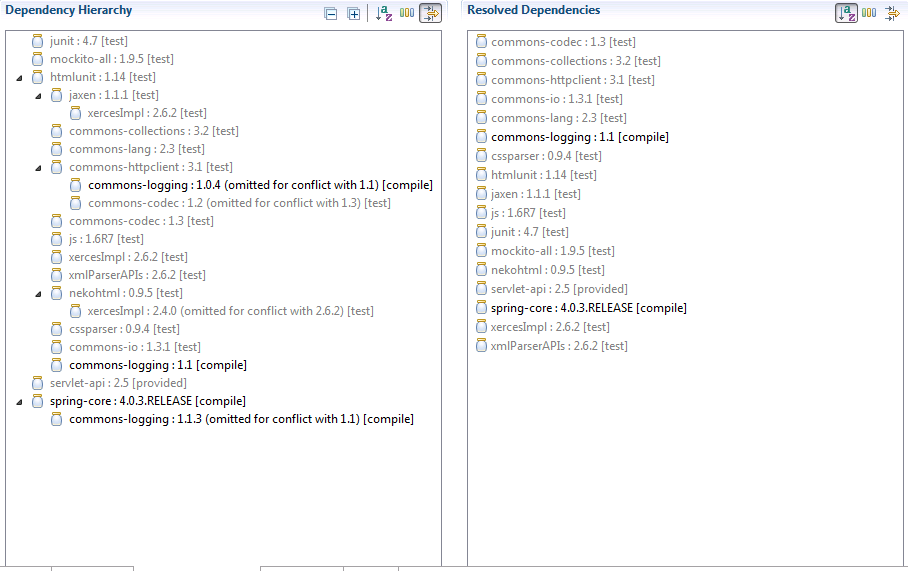
To illustrate how Maven works, let looks at the dependency hierarchy generated by Eclipse for my project:


In this project, I include spring-core with compile scope and html-unit with test scope. html-unit has transitive dependency commons-logging version 1.0.4 while spring-core has identical dependency with version 1.1.3.

When Maven resolving dependency, it note that there is already commons-logging in the resolved dependencies and choose to omit version 1.1.3 even if it is the later version. Still, it update the commons-logging dependency of html-unit to compile scope because this is the widest scope of the dependency.

End up, I package an older version of commons-logging dependency. If I swap the order of declaration between spring-core and html-unit, I have


So this time, Maven give me commons-logging version 1.1.3 rather than 1.0.4.

If you do not know how Maven resolve dependencies, this will be an endless source of confusion. If you know it well, it is kind of easy. Please remember to use a tool to generate dependency hierarchy and keep track of it.

To avoid this problem, please clearly specify the version of dependency in pom file. In this case Maven will give higher priority for dependency over transitive dependency.


In this last example, I manually declare commons-logging with version 1.0.2 and it override the versions for all 3 occurrences of transitive dependencies.

Wednesday, 2 April 2014

Servlet API - Part 2

In the earlier part, we have discussed Servlet API 2.5. There are 3 more versions of Servlet API before 2.5 but the differences is too minor to mentioned. If you want to know in details, please search for the change log of Servlet API.

The next version after 2.5 is Servlet API 3.0 (the latest at the time of writing is 3.1). There is a reason for the big jump in version number. Servlet API 3.0 is a total revamp, which totally change the way the web application was developed. This article will discuss the changes of Servlet API 3.x versus earlier versions.

Background

Deployment Descriptor

When J2EE was first developed, it combined of Java components plus deployment descriptor. The goal is to make application configurable by changing deployment descriptor file. In deed, it offers flexibility for developers to modify application behaviour without code change in production environment. However, this feature was overrated. Let take a look at web.xml file. How often do we need to change servlet mapping, adding filter or even changing security constraint?

Moreover, the deployment descriptor file is long and tedious to write. It was proposed to have dedicated person to maintain the file but this wish never came true. Most of the time, developers end up creating deployment descriptor file and even creating deployment script.

This time also observed the trend of single application being developed by multiple teams. Sharing a single deployment descriptor is harder to developer feature in parallel.

The rise of RoR and Annotation

As we already know, good developers are innovative and lazy. They always manage to find way to make development easier, faster and better. There are major events happened in this time that marked the changing of mindset in industry.

At first, it witnessed the success of Ruby on Rail framework. This framework was built with Convention over Configuration principle. It help to greatly reduce the effort of configuring webapp.

Secondly, Java 5 introduction brought developers the choice to use annotation. At first, it was not so cleared how annotation suppose to change the way application was developed but very soon, the community find a great use of it. Annotation can be included in the runtime (RetentionPolicy.RUNTIME) and it can be used together with Java reflection to define how the component suppose to be used.

Alternative ways to build web application

To avoid complexity of Servlet API, developers often make use of MVC and IOC framework to build web application. For example, if a developer build a J2EE web application, he/she should adopt an architect diagram similar to this:


Rather, most of them choose an alternative solution


Comparing these two designs. the below is much  simpler to create, provide that the Service can be injected automatically and the annotation or convention can be used to identify mapping between HTTP request and the service method serving it.

Slowly, J2EE lost its popularity and Sun knew that they need to change.

Servlet API 3.0 & 3.1

Servlet API 3.x adopts proven ideas of the Java community and pull out a very sophisticated solution. If you look from the bird eye view, it look pretty much similar to existing frameworks in the market. It actually built on the same idea.

Our team has been one of the early adopters when Java EE 6 arrived but later switched back to Spring framework due to memory leak issue with Glassfish. One of our senior developer took only 3 days to completed the switch for a application built by 6 developers in 1 year. It should not be that fast if the two technologies stacks are not similar.

Servlet API is not supposed to be used alone, it always comes with Context and Dependency Injection.

Let take a look in details of the changes

Annotation

Servlet API 3.x do not abort any concept from Servlet 2.x, Rather, it allows the entity to be declared by annotation in stead of using deployment descriptor. For example, here it how we declare a Servlet by annotation:

@WebServlet(name="Servlet", urlPatterns={"/anyUrl"})
public class AnnotatedServlet extends HttpServlet {  
}

It is definitely simpler than writing XML in deployment descriptor. When Servlet API 3.0 was introduced, Servlet can be POJO, but later, it was switched back to inheriting HttpServlet. It gave a clear signal that Java is and will still be conservative. It will not move that far like Rails by totally removing URL mapping.

Even after using annotation, Servlet API still has a major difference with Spring MVC. The annotation @RequestMapping in Spring MVC can be placed on both Controllers and methods. It is convenient when you want to your Controller to serve multiple URLs (think of it when you want to implement Rest API). 

In contrast, Servlet only support HTTP methods like doGet, doPost,... It means that you still need to add a bit more effort to implements Restful API or stick with Java Server Face. As JSF page is rendered in server, it knows how to access Servlet methods without going through URL Mapping

Context and Dependency Injection

CDI has never been part of Servlet API but I cannot resist the temptation to talk about it. Servlet API will not be that helpful if you cannot use Dependency Injection to inject the beans to Servlet. If you use Spring MVC, the Bean is pretty much stateless and singleton. It does not relate directly with User Session. If you need to access user session, you need to add session support from a security framework or simply pass the values in as method parameters. 

In contrast, EJB has the stateful bean. Container supposes to serve the same stateful bean for all requests from same user, which make it effectively user session. EJB also support stateless bean but they are not singleton. Normally, container serve stateless bean from stateless pool. 

This difference will affect how you want to design your application. As the world is moving toward stateless session for scalability, I would prefer to use cookie-based session rather than server side session. In this case, stateful bean provide little value. Fortunately, we still have Request scope bean for this purpose. 

The word 'Context' from CDI come from the fact that you can define the scope for beans when injecting it. There are fours scopes: @RequestScoped, @SessionScoped, @ApplicationScoped, and @ConversationScoped. As we can see, most of the scopes are only meaningful in Web context.

Asynchronous Support

Servlet API 3.x did a good job by introducing Asynchronous support. As I have discussed in one of my earlier articles, asynchronous in Servlet API 3.x has nothing to do with Asynchronous HTTP request. It aims to solve different problems. 

Container comes with HTTP thread pool. Each thread serve one request at one time. However, as explained here, sometimes the server cannot serve the request quickly enough due to some inputs waiting. In this scenario, we want to free HTTP thread so that it can serve other requests. 

The new model is to let the current HTTP thread exit, waiting for result to be available and use another HTTP thread to render response. As the information necessary to render response are passed to Servlet methods as parameters (which means data are stored in stack memory), it cannot be shared among 2 HTTP threads. This was overcome by storing shared data in AsyncContext.

Deployment Descriptor

Introducing annotation does not block you from using deployment descriptor. However, deployment descriptor in Servlet API 3.x is very flexible. It even can be split to modules. Each jar files can have their own modular deployment descriptor file store inside META-INF folder. The modular deployment descriptor will only be detected at runtime. This make the modules pluggable.

Both annotation scanning and web fragment scanning can be turned on or off in web.xml.

Programmatic Addition   

Servlet API 3.x allows you to add Servlet, Filter and Listener programmatic. This features came as a surprise because no open-source framework in the market offer any equivalent. Unfortunately, I cannot comment much on this feature as I have not gone through any use case for it.

Conclusions

Servlet API 3.x also provide some other minor improvements that I will not dig further in the scope of this articles. However, with what have been covered, I hope readers can have a basic understanding about Servlet API 3.x